Step-by-Step: Deciding an Application
The Application Decision Flow (/application/:hex/decide) is used by Branch Managers, Risk Officers, and Executive Directors in /applications/queue to evaluate, sanction, return, or reject credit dossiers.
1. Multi-Tier Underwriting Ladder & Four-Eyes Policy
Underwriting authority is segmented by sanction limits (org_authorities):
| Approval Stage | Typical Role | Delegation Limit | Required Sign-off Criteria |
|---|---|---|---|
| Level 1: Origination | Loan Officer | N/A | Captures facts, verifies capacity evidence, submits dossier. |
| Level 2: Branch Review | Branch Manager | Up to KES 250,000 | Cross-checks field verification, endorses capacity, approves or escalates. |
| Level 3: Credit Risk | Chief Operating Officer (COO) | Up to KES 1,000,000 | Evaluates portfolio concentration and collateral coverage. |
| Level 4: Credit Committee | Managing Director | Above KES 1,000,000 | Final executive sanction for high-value or exception facilities. |
The Four-Eyes Rule
- A loan officer cannot approve an application they originated.
- An approver who signed an earlier stage cannot sign a subsequent stage.
- System enforcement is immutable: any attempt to self-approve results in a
409 four_eyesrejection.
2. The Three Steps of Deciding
Step 1: The Dossier & Policy Audit
- Application Overview: Inspect borrower name, National ID, requested principal, tenor, interest method, and stated economic purpose.
- Endorsement History: Reviews earlier signatures in the chain (e.g., Loan Officer’s initial submission memo and timestamp).
- Automated Check Strip:
kyc: Validates that borrower’s KYC verification is active and within expiration horizon.blacklist: Confirms 0 matches against fraud and regulatory watchlists.exposure: Checks cumulative borrower exposure across all active facilities.dpd: Asserts 0 overdue days on open facilities.collateral: Asserts forced-sale valuation meets or exceeds required coverage ratio.
- If any mandatory check fails, the Approve option is locked.
- Click Continue.
 Figure 5.1: Step 1 Underwriting dossier review displaying borrower facts, officer memo, and policy check strip.
Step 2: Formulating the Underwriting Decision
Select one of three binding operational rulings:
┌─────────────────────────┬─────────────────────────┬─────────────────────────┐
│       [ APPROVE ]       │        [ RETURN ]       │        [ REJECT ]       │
│ Advances to next stage  │ Back to officer desk    │ Application declined    │
│ or to disbursement      │ with specific fixes     │ definitively            │
└─────────────────────────┴─────────────────────────┴─────────────────────────┘
1. If Approving:
- Enter optional Underwriting Covenants & Conditions (e.g., “Approved subject to original motor vehicle logbook and certified valuation deposited in branch vault prior to disbursement”).
- If the application amount is within your delegation limit, it lands on
status = 'approved'. - If the amount exceeds your delegation limit, it advances to the next stage in the hierarchy (e.g.,
stage = 'director').
2. If Returning:
- Enter a mandatory Remediation Note specifying what must be amended (e.g., “Customer bank statement is missing page 4; please obtain a certified 6-month statement and resubmit”).
- The file reverts to
status = 'draft'on the originating loan officer’s desk.
3. If Rejecting:
- Select the official Statutory Grounds for Rejection:
Insufficient cash flow / debt service capacityCollateral or security valuation deficitUnsatisfactory credit history / high external indebtednessIncomplete, expired, or unverified KYC documentationPolicy violation / regulatory non-compliance
- Enter a mandatory Explanation Note that will be recorded in the audit trail.
- Click Continue.
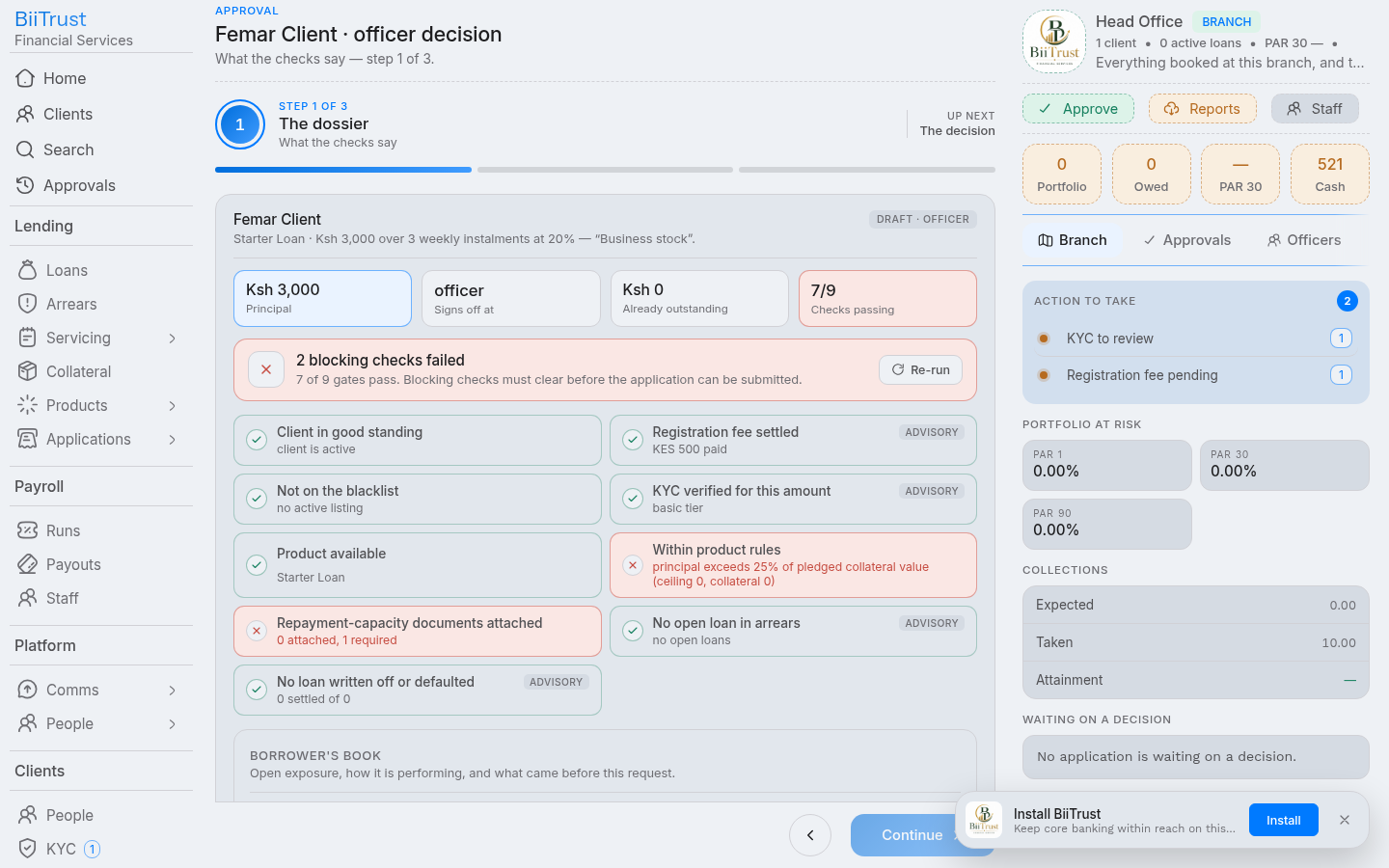 Figure 5.2: Step 2 Selecting underwriting decision (Approve/Return/Reject) and entering covenants.
Step 3: Confirm & Digital Signature
- Read-Back Summary: Consolidates the decision, recorded covenants, and the resulting state.
- Statutory Acknowledgment: Check the mandatory box:
- “I have read the dossier and credit policy checks, and I record my decision within my authorized delegation.”
- Sign Decision:
- Click the action button (Green for Approve, Blue for Return, Red for Reject).
- The digital signature logs to the audit register (
system_audits). - When the final approval stage is signed, the application immediately displays a Disburse Funds button.
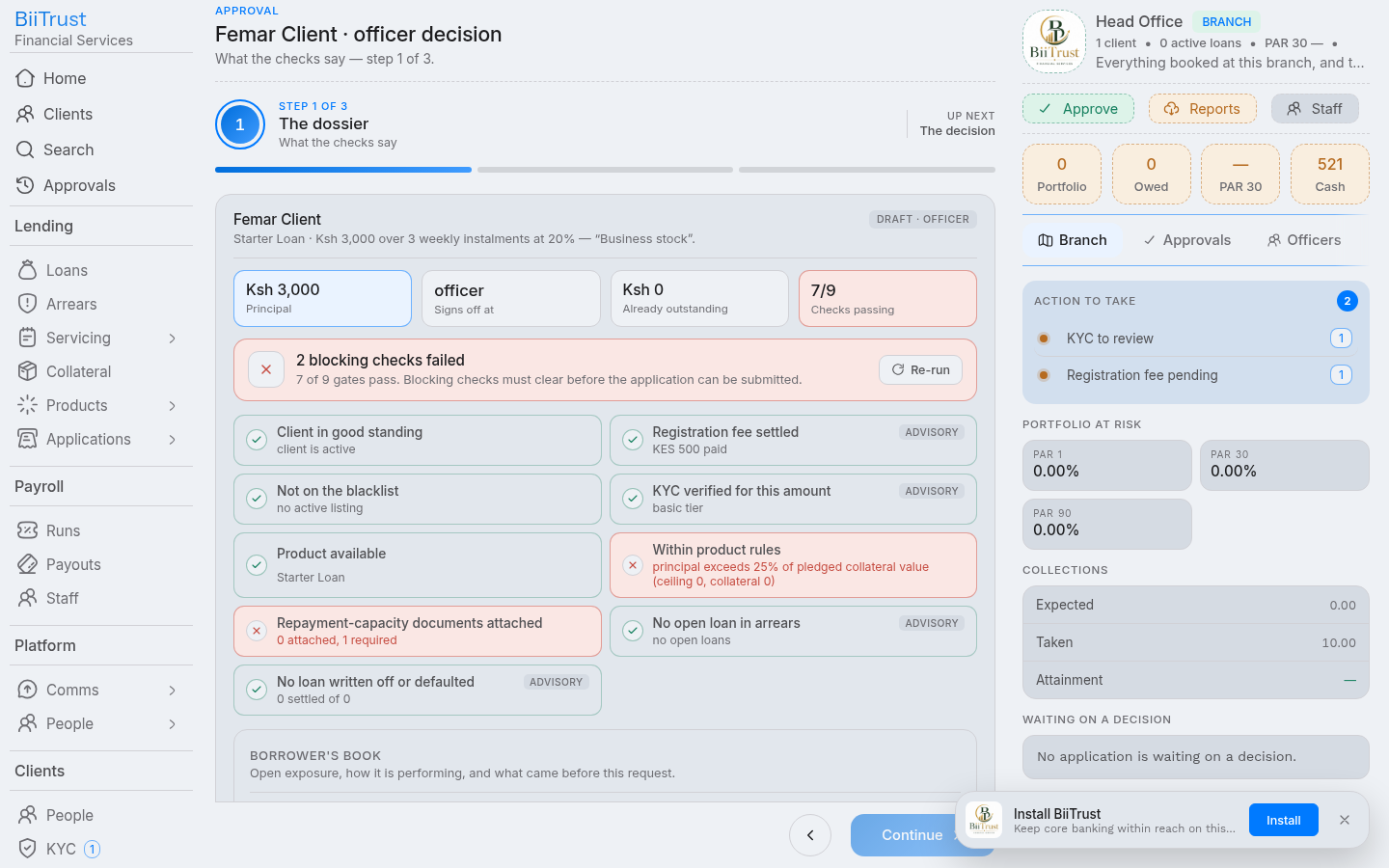 Figure 5.3: Step 3 Final digital signature signoff committing sanction and unlocking the disbursement button.